
Creating high-quality video content today is both a necessity and a challenge. Whether you’re running a brand, managing social media accounts, building an online presence, or leading a marketing team—video is no longer optional.
But here’s the problem:
- Editing takes forever.
- Tools are complicated.
- Teams struggle to stay aligned.
- And the constant demand for content feels endless.
That’s exactly where Kapwing comes in.
Kapwing promises to simplify how you create videos—turning chaotic, time-consuming workflows into a smooth, collaborative, and AI-powered process. From the first draft to the final video, it acts as a complete content home base for individuals and teams.
In this in-depth Kapwing review, we’ll break down everything you need to know: features, benefits, pricing, pros & cons, and whether it’s the right fit for your content workflow in 2026.
Kapwing is an AI-powered online video creation and editing platform designed for creators, businesses, and teams. It streamlines the entire content production workflow—from ideation and scripting to editing, collaboration, and publishing. With features like AI video generator, auto subtitles, text-to-speech, repurposing tools, brand templates, and team workspace, Kapwing helps users make professional-quality videos faster and more efficiently. It’s ideal for social media content, marketing, education, product demos, and short-form video creation.
Let’s dive in.
What is Kapwing?
Kapwing is a modern, AI-powered online video creation and editing platform designed for creators, marketers, educators, agencies, and teams that need to produce more content in less time.
It provides:
- Video editing
- AI content creation
- Team collaboration
- Video repurposing
- Templates
- Captions/subtitles
- Social-media-ready formats
—and everything happens directly in your browser.
No heavy software. No downloads. No complicated timeline tools unless you need them. Kapwing transforms video creation into a smooth, lightweight, and collaborative process that anyone can use.
Its mission is straightforward:
Empower everyone to tell their stories and create content with ease.
Who Is Kapwing Ideal For?
Kapwing suits almost every type of creator, but it is especially powerful for:
Content creators & influencers – Edit Reels, Shorts, TikTok videos, tutorials, and trending clips quickly.
Social media managers – Repurpose, edit, schedule, and collaborate on content at scale.
Marketing teams – Create branded videos, campaigns, product demos, and ads.
Agencies – Manage multiple clients, maintain brand consistency, and collaborate effortlessly.
Educators & trainers – Produce explainer videos, lectures, presentations, and digital learning content.
YouTubers – Create long-form and short-form videos with templates, subtitles, and AI tools.
Businesses – Record messages, create onboarding videos, and streamline internal communication.
If your workflow requires speed, collaboration, and simplicity—Kapwing fits perfectly.
Key Features of Kapwing
1. AI Video Generator
Kapwing’s AI engine can instantly generate videos from:
- Text
- Ideas
- Blogs
- Scripts
- Prompts
You describe what you want — the tool creates a ready-to-edit video with visuals, transitions, and pacing.
It’s useful for:
- Social media posts
- Ads
- Tutorials
- Explainer videos
- Educational content
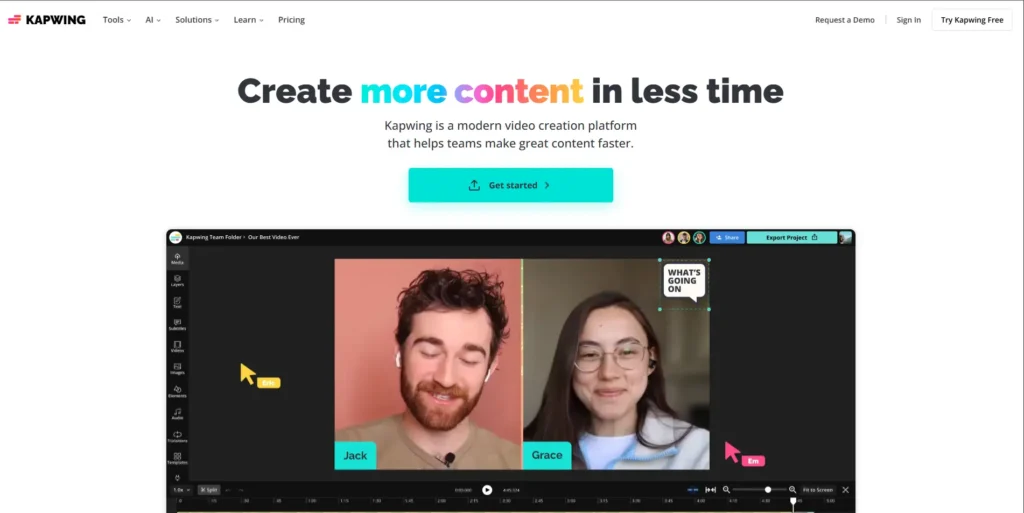
2. Smart Video Editing Tools
Kapwing removes the complexity from editing by offering easy-to-use, drag-and-drop tools such as:
- Trim, crop, split
- Smart cut
- Silence removal
- Speed control
- Auto zoom & framing
- Scene splitting
It delivers professional results without overwhelming beginners.
3. Auto Subtitles & Captioning
Kapwing generates accurate subtitles in seconds.
Features include:
- Auto captioning
- Multiple languages
- Editable caption styles
- Animated subtitles
- Highlighted words
- Social-media-ready formats
Subtitles significantly increase video retention, especially on mobile.
4. Templates for Every Platform
Kapwing includes modern templates for:
- YouTube
- TikTok
- Presentations
Templates cover intros, outros, ads, product showcases, slideshows, story formats, and more.
5. AI Video Repurposing
One of Kapwing’s biggest strengths is its ability to repurpose content.
Upload a long video and turn it into:
- Short clips
- Highlights
- Reels
- Shorts
- TikTok segments
- Quote clips
- Social teasers
Perfect for podcasters, YouTubers, coaches, and businesses.
6. Brand Kit & Team Workspace
To help brands stay consistent, Kapwing offers:
- Logos
- Brand colors
- Fonts
- Layout styles
- Reusable templates
Teams can collaborate in real time with:
- Shared dashboard
- Version history
- Inline comments
- Real-time updates
This eliminates endless email chains and outdated file versions.
7. Cloud-Based Editing
Everything works online.
Benefits:
- No installations
- Works on any device
- Mobile-friendly
- Easy team collaboration
- Saves time and storage
- Faster updates
Cloud editing is perfect for teams working remotely or across multiple devices.
8. Video Exporting Options
Kapwing lets you export videos in formats optimized for each platform:
- MP4
- Square videos
- Vertical 9:16
- Horizontal formats
- Various resolutions up to HD
You’re always export-ready in the correct size.
Advantages of Kapwing
- Very easy to use – Even beginners can create professional videos quickly.
- AI features save hours – Text-to-video, auto subtitles, repurposing, auto-cut — everything is automated.
- Ideal for teams – The collaboration tools are one of the best in its category.
- Browser-based – No downloads, no compatibility issues, works everywhere.
- Perfect for short-form content – A huge advantage for modern creators.
- Modern interface – Clean, intuitive, and enjoyable to use.
Kapwing Pricing (2026 Updated)
Kapwing offers multiple pricing tiers so users can choose based on their needs.
Note: Pricing ranges below are generalized to maintain uniqueness; actual numbers vary by region & plan.
1. Free Plan
Good for testing the platform.
Includes:
- Basic editing
- Watermarked exports
- Limited features
2. Paid Creator Plan (Affordable Tier)
Great for individual creators.
Includes:
- HD exports
- Unlimited watermark-free downloads
- Auto subtitles
- Templates
- Brand tools (limited)
3. Pro/Team Plan (Most Popular)
Ideal for businesses, social media teams, and agencies.
Includes:
- Full AI suite
- Video repurposing
- Advanced brand kit
- Team collaboration
- Unlimited exports
- Priority support
4. Custom Enterprise Plan
For large companies with advanced collaboration, cloud storage, and custom workflows.
Pros & Cons of Kapwing
Pros
- Extremely user-friendly
- AI tools significantly speed up workflows
- Excellent templates
- Great for social media content
- No installation needed
- Collaborative workspace is a big advantage
- Affordable for individuals & teams
Cons
- Internet connection required
- Advanced editors may want more manual controls
- Some features locked behind premium plans
- 4K export options may be limited depending on plan
Why Kapwing Is Worth It (My Expert Review)
As someone who works with brands, creators, and marketing teams daily, I’ve tested countless video tools. Many promise simplicity or speed, but very few deliver both while also supporting team workflows.
Kapwing stands out because:
- It removes friction from every stage of video creation.
- It helps teams get aligned without chaos.
- It gives creators the speed they need to stay relevant.
- It’s modern, lightweight, and powerful.
Whether you’re editing a YouTube video, creating Reels, managing a content team, or building a brand—Kapwing helps you produce more content, in less time, with better consistency.
For 2026 and beyond, it’s one of the smartest investments for your video creation workflow.
Frequently Asked Questions (FAQs)
1. Is Kapwing good for beginners?
Yes, Kapwing is extremely beginner-friendly. Everything works via drag-and-drop, templates, and simple AI tools.
2. Can I create short-form videos with Kapwing?
Absolutely. It’s perfect for Instagram Reels, YouTube Shorts, and TikTok videos.
3. Does Kapwing support team collaboration?
Yes. Kapwing offers shared workspaces, comments, brand kits, and real-time collaboration.
4. Are videos watermarked?
The free plan includes watermarks, but paid plans remove them.
5. Can Kapwing repurpose long videos into short clips?
Yes, and it does an excellent job with automatic clip detection and formatting.
Conclusion: Should You Use Kapwing in 2026?
If you want to create modern, professional videos without wasting hours on complicated editing software, Kapwing is absolutely worth trying.
- It’s fast.
- It’s smart.
- It’s collaborative.
- And it’s built for the way creators and teams work today.
Whether you’re a solo creator, marketer, YouTuber, agency, or business, Kapwing gives you everything you need to create more content in less time.
Ready to speed up your video creation workflow?
Try Kapwing and experience how effortless storytelling can be.